- Reference
Expressions
Within the configuration of an ezeio, mathematical expressions are used to produce a value/result for “Fields”, “Alarms” and “Conditions”. This powerful tool can produce mathematical and logical results using multiple constants and/or variables from the available resources on an ezeio. Expressions can be as simple as the constant “1” to indicate True/ON or as complex as necessary.
Functions & Operators#
Many of the valid functions and operators will be familiar to you, such as +, -, >, <, and =. Others come from advanced mathematics and logic, such as sin(), tan(), ||, and &&. Another category relates specifically to eze System terms and functions, such as Day() and K2F().
Syntax#
The syntax structure of eze System expressions follows common mathematical and logic standards for precedence and functional format.
For example, 2+3*4 equals 2+(3*4) or 14, since multiplication takes precedence over addition.
Boolean logic#
Any value greater than 0 is considered 'true'.
0 and all negative values are considered 'false'.
The result of a condition, such as (f(1)>45), results in the value 0 (if false) or 1 (true).
Field expressions#
The Data Expression box under Field configuration determines the value of the field.
If left blank, the field value is not updated by the system, and will simply remain the same until changed by the user manually or by a script using the SetField function.
The most common field expression simply takes the value of a register and applies it to the field.
r(4, 2) // get the value from device #4, register 2A single expression can reference other fields and registers.
f(4) + f(5)         // the sum of the values in field #4 and field #5
r(1,1) * 100 - 50   // multiply the value of register 1 on device 1 with 100 and subtract 50
abs(f(10)-f(12))    // the absolute difference between field 10 and 12
Uptime()/60         // Set the field value to the number of minutes since last reboot
The Data Expression is evaluated at a fixed rate of 10 times per second (100ms interval). This can be used to create counters and accumulators.
Example: Run-time counter#
If our Field #1 monitors the current draw of a device, and the device is considered running if the current exceeds 5A, we can use this expression to count the total run-time in seconds in field #2:
Field #2 Data expression:
f(2) + ( f(1)>5 )/10
Starting with the condition (f(1)>5), this will return 0 (false) if the device is not running, and 1 (true) if it is running. So as long as the device is not running, we're adding zero to the f(2) counter. When the device is running we are adding 0.1 to the f(2) counter, and since this happens 10 times per second, we'll add a total of 1 each second.
This way we've implemented a run-time counter.
Example: Total volume accumulator#
Assume our Field #1 holds the output of a flow sensor, in L/s (Liters per second).
We want out Field #2 to reflect the total amount in Liters.
Field #2 Data expression:
f(2) + f(1)/10We simply add 1/10th of the value of the momentary flow to our accumulator f(2).
Example: kWh from kW#
In this example, field 1 holds our momentary power in kW. We want to accumulate this into energy (kWh) over time.
Field #2 Data expression:
f(2) + f(1)/36000Since we are looking for kW-hours, we need to divide the momentary power with 36000 (3600 seconds in an hour, and we are re-evaluating 10 times per second).
Example: Signal filter#
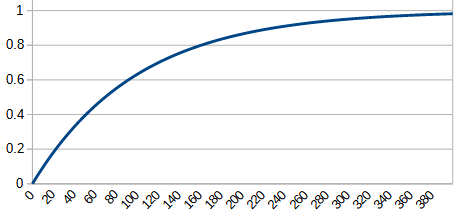 If data from a register (or other field) includes a lot of noise and needs to be filtered over time, a simple field expression can be used to implement a IIR filter function:
( f(THIS)*99 + r(1,1) )/100Knowing that the expression evaluated 10 times per second, we are keeping 99% of the value, and adding 1% from the signal every 100ms. Thus the response time for this filter is about 7s for a 3dB (50%) response.
Reverse expressions#
The reverse expression on the field is only relevant if the register referenced in the Data Expression is writable.
In most cases, the reverse expression can be left blank, and the ezeio will use the value from the field unchanged to write back to the register. Note also that the “Writable” checkbox needs to be checked in order to allow the field value to be changed by the user.
The reverse expression can be useful if there is math to scale the register value in the Data Expression. For example if we have a read & writable register with a temperature scaled x100 (so 4567 is 45.67 degrees), we would have a data expression like this:
r(1,1)/100Now if the user want to set the temperature, we need to multiply the user-entered value with 100 before we write it back to the register. Thus our reverse expression need to be:
f(THIS)*100The macro “THIS” always reference the current item.
Example: Simple control with Reverse expression#
In combination with the “Continuous Write” checkbox, the reverse expression can be used for simple control logic.
When Continuous Write is checked, the reverse expression is evaluated every 100ms (10 times per second).
Assuming the Field is tied to a relay output in the Data Expression, we can use this to implement a simple control function by using the following expression:
( f(1)>40 ) * 100This expression will look at field #1, and if it's larger than 40, it returns 100. If 40 or less, it returns 0. The result will directly control the relay, actuating it if the value of field 1 exceeds 40.
In this section
- Absolute valueReturns the absolute value of a.
- Alarm InformationReturns information of a given alarm.
- Alarm statusReturn the current status of an alarm.
- Analog input valueReturns the value of a physical input.
- Arc CosineReturn the arc cosine of a.
- Arc SineReturn the arc sine of a.
- Arc TangentReturn the arc tangent of a.
- BitReturns the status of the given bit in an integer value
- BooleanReturns 1 if the value a is larger than 0. Returns 0 if a is zero or negative.
- Celsius to KelvinReturns the temperature converted from Celsius to Kelvin
- Common LogarithmReturns the common logarithm (base-10 logarithm) of a.
- CosineReturn the cosine of a.
- DayReturns the current day of the month.
- Device StatusReturn the current status of a device.
- ElevationReturns the elevation as reported by a GPS.
- ExponentReturns the value of e raised to the a:th power.
- Farenheit to KelvinReturns the temperature converted from Farenheit to Kelvin
- Field valueReturn the current value of a field.
- Field value from log dataReturn the field value from the log data, from seconds ago.
- Field value from remote unitReturn recent value of a field from a remote unit
- FloorReturns a rounded down to the closest integer.
- From/In rangeCheck if the value is between 0 and the range .
- HourReturns the current hour
- Hour, Minute, SecondReturn encoded hour-minute-second
- Kelvin to CelsiusReturns the temperature converted from Kelvin to Celcius
- Kelvin to FarenheitReturns the temperature converted from Kelvin to Farenheit
- LatitudeReturns the Latitude as reported by a GPS.
- LongitudeReturns the Longitude as reported by a GPS.
- MaxReturn the larger value of a or b.
- MinReturn the smaller value of a or b.
- MinuteReturns the current minute
- MonthReturns the current month.
- Natural LogarithmReturn the natural logarithm of a.
- Operators and ConstantsThe following operators are supported in expressions:
- Random numberReturns a random number between 0 and a.
- Real time / EPOCHReturns the epoch / unixtime.
- Register ageReturn the age of a register.
- Register valueReturn the current value of a register.
- RoundReturns a rounded to the nearest integer.
- Schedule statusReturns the status of the schedule number referenced Returns 1 if currently in schedule. Returns 0 if currently out of schedule.
- SecondReturns the current second
- SineReturn the sine of a.
- Square rootReturns the square root of a.
- System ItemReturn a system status value.
- TangentReturn the tangent of a.
- This (field/alarm number)Holds the index number of the current field or alarm
- Time toReturn the difference between current local time and the given time.
- UptimeReturn number of seconds since last reset.
- User defined memoryReturns the value of a user-defined cell.
- WeekReturns the current week number.
- WeekdayReturns the current weekday.
- Year, Month, DayReturn encoded year-month-day
Last updated Nov 16, 2022