- Cloud interface
- Manage screen
- Dashboards
- Widgets
Field Value
Features common to all Widgets and general Dashboard info can be found on the Widgets section of the manual.
General Dashboard and Widget info#
Features common to all Widgets and general Dashboard info can be found on the Widgets section of the manual.
Description#
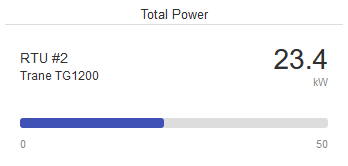
The eze.io Field Value widget displays the current value of a single field as a numeric value. A horizontal bar and the bottom of the widget shows value as the percentage of the Field's range. This widget is designed for live/instantaneous values. These values could be rapidly changing such as a power reading (kW) or slow like a tank level.
Minimum size (value, name, unit only) - 2 x 2 grid units
Minimum size (full feature) - 3 x 6 grid units
Features / Options#
- Numeric value shown with unit
- Percentage of range shown as horizontal level bar
- 3 user defined text fields displayed
Settings#
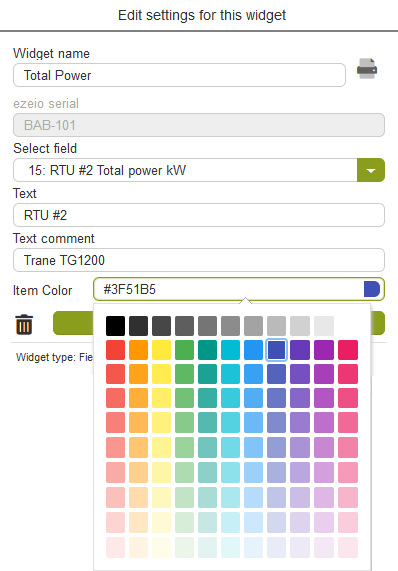
Widget name#
Appears top and center of widget
Select field/s#
A drop down menu provides the means to link to a specific “Field”, from the desired ezeio. For more information see mapping on the widgets page.
Text#
Enter text to be displayed to the left of the Field value (1st line)
Text comment#
Enter text to be displayed to the left of the Field value (2nd line)
Item color#
Click on the color swatch to access the color palette and select a color for the range bar
Last updated Oct 1, 2021